🌮
Taco Bot
Tinqs Meeting Assistant
ServerOnline
TLSSecured (Caddy + Let's Encrypt)
Your accessNot authenticated
How to connect
Taco Bot is the Tinqs meeting assistant. It listens during Google Meet calls, answers questions about company docs, and summarizes conversations. Access requires authentication via one of two methods:
Team (Tailscale)
Direct browser access
Connect to the tinqs.com tailnet, then access Taco via its Tailscale hostname. Full identity resolution included.
Extension (any network)
Chrome extension
Install the Taco extension, enter the API secret, and it works from any network — home, office, mobile hotspot.
Install the Chrome extension
- Open
chrome://extensionsin Chrome (or Edge). Enable Developer mode — the toggle is in the top-right corner. Then click Load unpacked (top left).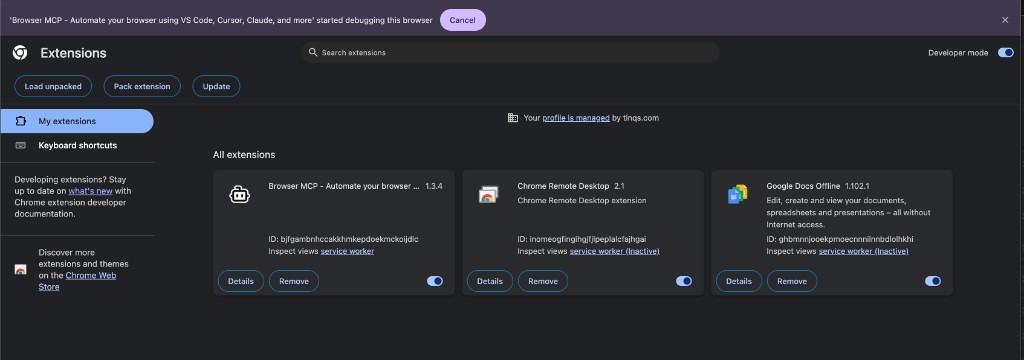 Enable Developer mode, then click "Load unpacked"
 - A folder picker opens. Navigate to the
taco-botrepo and select the extension subfolder — not the root folder, notlibornode_modules. The correct folder containsmanifest.json,popup.html, andservice-worker.js.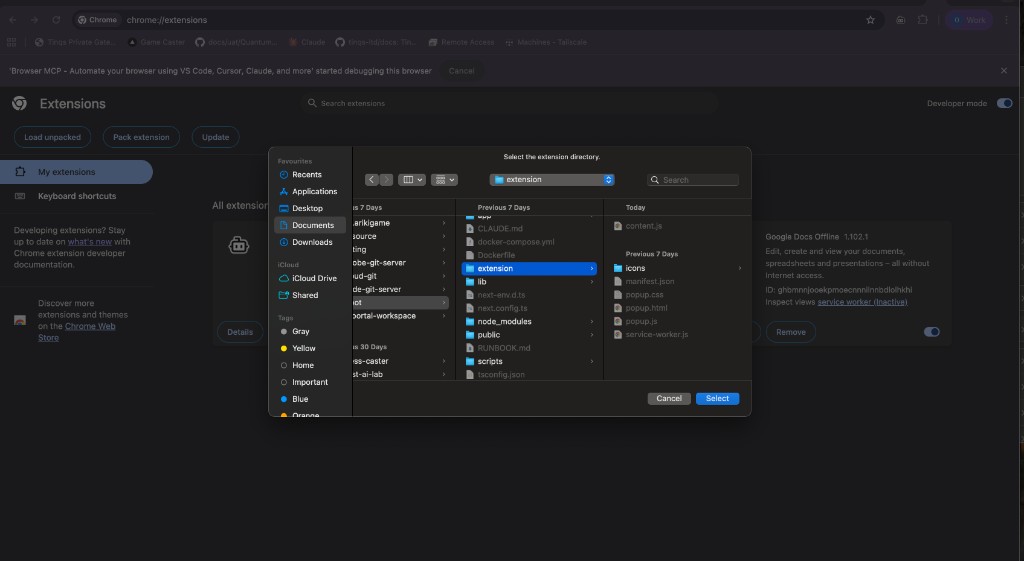 Select the "extension" folder (highlighted in blue), then click "Select"
 - The Taco icon (🌮) appears in your Chrome toolbar. Click it to open the popup. Set Gateway base URL to:
https://taco.arikigame.com - Enter the TACO API secret — ask Ozan or check the team Devops chat for the current key.
- Click Test connection. You should see "OK — Taco v0.1 (remote config loaded)." Done.
Using Taco in a meeting
Join a Google Meet call with the extension installed. Taco activates automatically and watches captions and the chat box.
- Say "Hey Taco" during the call, or type Taco in the Meet chat.
- Ask your question naturally — "Hey Taco, what's the next milestone for Isleborn?"
- Taco searches company docs on Git Studio and replies in the Meet chat within seconds.
API endpoints
Authenticated requests (Bearer token or Tailscale identity) can use:
GET /api/meeting/status
POST /api/meeting/ask
POST /api/meeting/transcript
GET /api/meeting/calendar